

Wiki & Guides
SCUM
Survival · Open World · Gamepires
SCUM Whitelist, Bans & Private Servers
ExclusiveUsers vs. WhitelistedUsers explained: make your SCUM server private via password or a real whitelist, ban players and hand out priority slots.
Last updated July 14, 2026 · RespawnHost
On this page
Securing your SCUM server: the options
SCUM controls access via user list files in the folder SCUM/Saved/Config/WindowsServer/ — plus an optional server password. Format of all lists: one SteamID64 per line; changes apply after a server restart.
The quick overview:
| File | Function |
|---|---|
ExclusiveUsers.ini | Real whitelist — only listed players may join |
WhitelistedUsers.ini | VIP/priority slots — not a whitelist! (see below) |
BannedUsers.ini | Banned players (filled automatically by #Ban) |
AdminUsers.ini | Admin rights — see admin commands |
ServerSettingsAdminUsers.ini | Access to the in-game settings menu |
Beware the naming trap: Exclusive ≠ Whitelisted
Warning
The file WhitelistedUsers.ini is not a whitelist: listed players get priority and can join even a full server — a random other player gets kicked to make room. If you actually want to lock down your server, you need ExclusiveUsers.ini.
This mix-up is the most common mistake when securing SCUM servers — many guides confuse the two files.
Option 1: server password (simple)
Set in ServerSettings.ini:
scum.ServerPassword=YourPasswordAnyone with the password gets in — good enough for private rounds with friends. Details on the file in configuring your server.
Option 2: real whitelist (ExclusiveUsers.ini)
- Open
ExclusiveUsers.iniin the panel’s file manager. - Add the SteamID64 of every allowed player — one per line. The ID (17 digits, starts with 7656…) can be found via steamid.io.
- Restart the server.
From now on nobody outside the list can join — ideal for communities with an application process or RP servers.
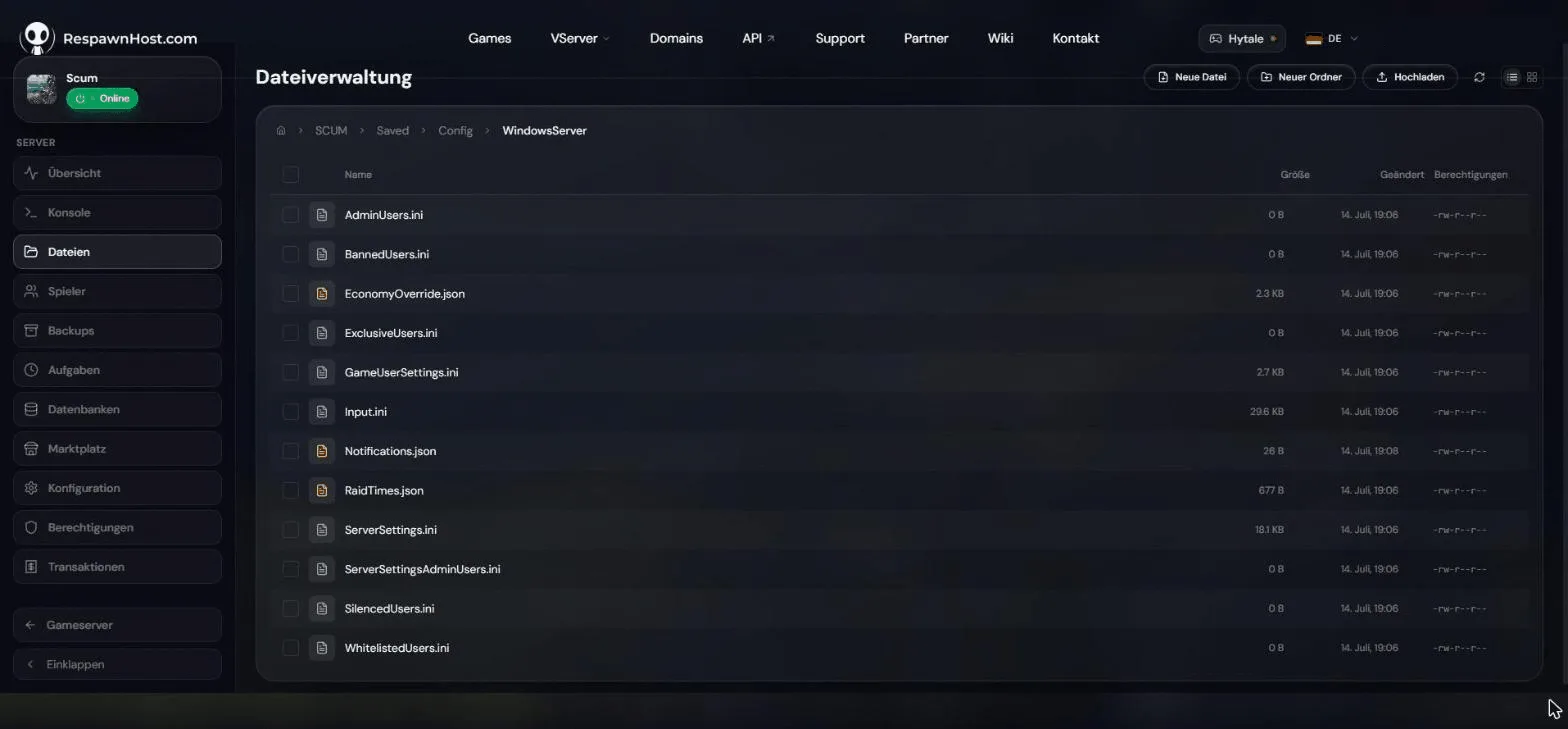
SCUM/Saved/Config/WindowsServer/VIP slots for regulars (WhitelistedUsers.ini)
On busy public servers priority slots are useful: add regulars, moderators or supporters to WhitelistedUsers.ini — they can join even when the server is full. Keep the cost in mind: a random non-VIP gets disconnected in exchange.
Banning players
In-game as admin via chat command:
#Ban PlayerName
#Unban 76561198000000000
#Ban writes the SteamID64 to BannedUsers.ini automatically — you can also edit the file directly, e.g. to ban offline players. All moderation commands (#Kick, #Mute …) are in the command list.
Frequently asked questions
Can I combine whitelist and password?
Yes — the password and ExclusiveUsers.ini work independently. Belt and suspenders, though rarely necessary.
Do changes apply immediately? No, the lists are read on server start — restart after every change.
Where do I get a player’s SteamID64?
On the server: #ListPlayers shows all connected players with their SteamID. Otherwise: paste the Steam profile URL into steamid.io.
Related guides
- Admin commands — kick, ban, mute & co.
- Creating and connecting to your server — basics
- Configuring your server — all server settings
Your own SCUM server?
At 3 hours a day that is about €10.13 a month. Billed by the second: server off, costs off.
- No subscription, no minimum term
- Balance does not expire while your account exists
- Online in under 90 seconds