
Wiki & Guides
Valheim
Survival · Viking · Iron Gate Studio · Coffee Stain Publishing
Valheim Crossplay: PC, Xbox, PS5 and Switch 2
Crossplay from Valheim 1.0: PC, Xbox, PS5 and Switch 2 on one server. Requirements, join codes, mods and save files explained.
Last updated September 8, 2026 · RespawnHost
On this page
Valheim crossplay: all platforms, one server
Since the crossplay update (patch 0.211.7, September 2022), players from different platforms can play together on one Valheim server. Technically this runs over the PlayFab backend (Microsoft) instead of Steam. Currently crossplay connects:
- Steam (PC)
- Microsoft Store and PC Game Pass (PC)
- Xbox One and Series X|S (console)
At RespawnHost, crossplay is enabled out of the box — the “Enable crossplay” startup variable defaults to 1.
Note
With the big 1.0 update on 9 September 2026, Valheim also launches on PlayStation 5 and Nintendo Switch 2. From then on there's full crossplay across all platforms — PC (Steam/Microsoft Store), Mac, Linux, Xbox One/Series, PS5 and Switch 2. Cross-progression only works between Xbox and PC (Microsoft Store/Game Pass). Before that, PS5/Switch 2 aren't included yet. All 1.0 facts are in the release guide.
Crossplay on or off?
- On (
1, default): The server runs over PlayFab, all platforms above can join, and a join code is generated. - Off (
0): The server runs as a pure Steam server over the Steam backend — Steam players only, no join code, no consoles.
Restart the server after changing this.
How players join
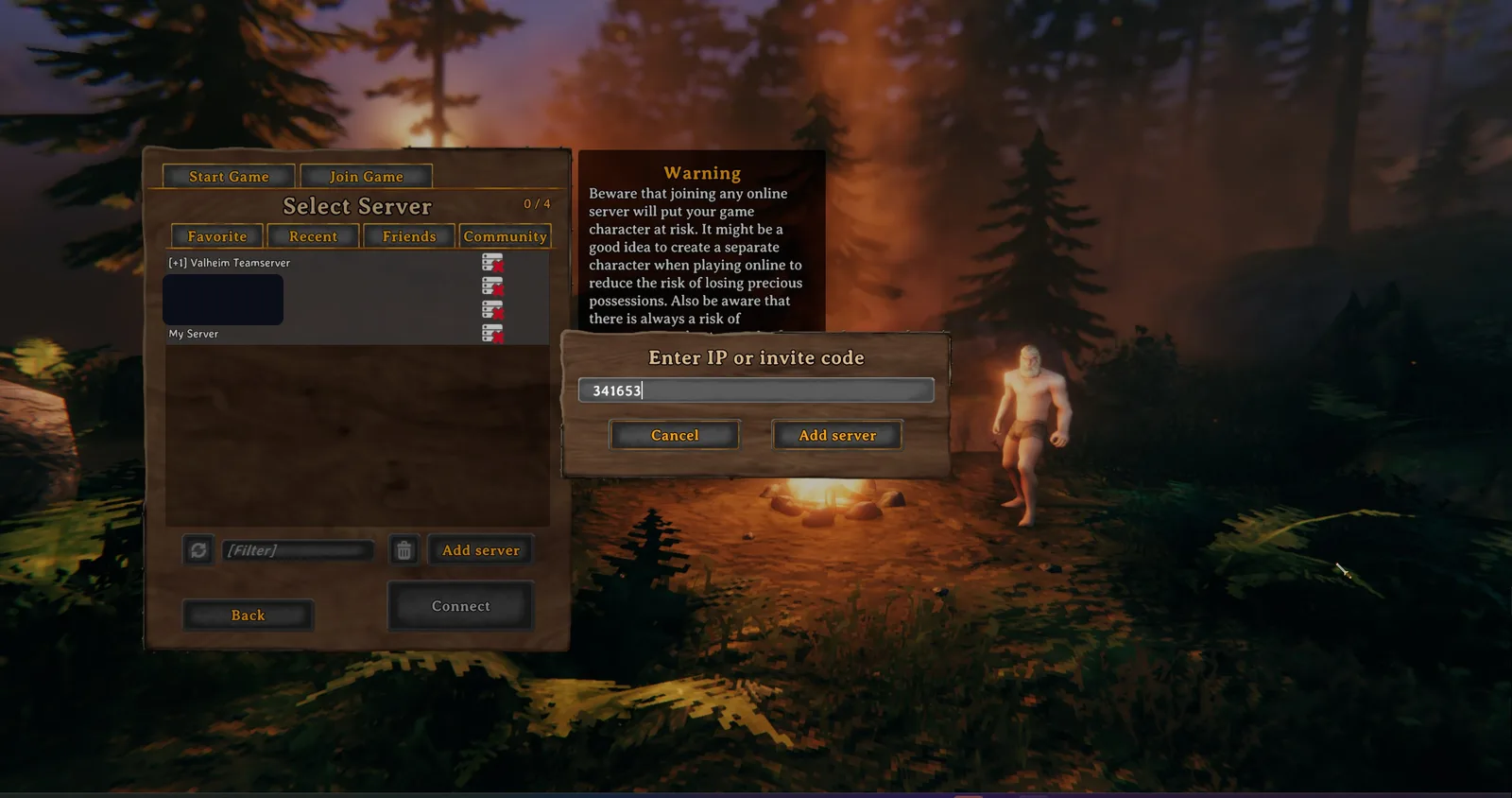
Via join code (cross-platform): A crossplay server generates a join code, visible in the join menu or pause menu. To join: Join Game → Add server → enter the code.
Warning
The join code is regenerated on every server restart. After a restart you'll need to give your friends the current code.
Via IP (PC only): Steam/PC players can still also join a crossplay server directly via IP:port (shown in the panel) — the join code is the cross-platform alternative.
Xbox and Game Pass players
An Xbox console can’t host its own dedicated server, but it can easily join one — provided both the Xbox and the server have crossplay enabled. Since the console has no classic IP entry, Xbox players connect via the join code in practice. The PC Game Pass/Microsoft Store version also uses the PlayFab network and can therefore only reach crossplay servers.
FAQ
Do I need port forwarding for crossplay? No — in PlayFab/crossplay mode no port forwarding is needed. At RespawnHost everything is set up anyway.
Why can’t my friend find the server? Usually the join code is stale (regenerated after a restart) or crossplay is off on one side. Share the current code and check that both have crossplay enabled.
Does a password keep the server private? Yes. Even a listed crossplay server stays protected with a server password — only those who know it can get in.
Related guides
- Renting & setting up a server — incl. server name & password
- Configuring your server — crossplay startup variable & more
Ready for Valhalla? Rent a Valheim server — online in under 90 seconds.
Your own Valheim server?
At 3 hours a day that is about €2.27 a month. Billed by the second: server off, costs off.
- No subscription, no minimum term
- Balance does not expire while your account exists
- Online in under 90 seconds