Wiki & Guides
Minecraft
Sandbox · Survival · Mojang Studios · Xbox Game Studios
Create an FTB Evolution 2 Server: Install and Set Up the Modpack
How to install FTB Evolution 2 on your Minecraft server: one-click modpack install, Java 25 for 26.1, RAM advice, world backups and 20% off with code FTBEVOLUTION.
Last updated October 8, 2026 · RespawnHost
On this page
- How do I get FTB Evolution 2 on my server?
- What is FTB Evolution 2?
- Which mods are in FTB Evolution 2?
- How much RAM does an FTB Evolution 2 server need?
- Step by step: order a new server with FTB Evolution 2
- Step by step: install FTB Evolution 2 on an existing server
- How do my friends join?
- What RespawnHost recommends
- Further reading
- FAQ
- Question: When did FTB Evolution 2 come out?
- Question: Which Minecraft version does FTB Evolution 2 use?
- Question: How do I install FTB Evolution 2 on a server?
- Question: How much RAM do I need for FTB Evolution 2?
- Question: Is there a discount code for an FTB Evolution 2 server?
- Question: Will I lose my current world when I install it?
- Question: How many mods does FTB Evolution 2 have?
- Question: Can I carry an FTB Evolution 1 world over to part 2?
How do I get FTB Evolution 2 on my server?
On RespawnHost you install FTB Evolution 2 from the Marketplace in the panel: open Modpacks, search for “FTB Evolution 2” on CurseForge, pick a version and install. The installer fetches FTB’s official server files and switches the server to Java 25, which Minecraft 26.1 requires. You can also pick the modpack while ordering a new server.
20 percent off with code FTBEVOLUTION
For the FTB Evolution 2 launch, the code FTBEVOLUTION takes 20 percent off. It applies to prepaid packages and the first month of a subscription, not to pay-per-use. It does not stack with the term discount; the bigger of the two wins. That makes it most useful on 30, 90 and 180 day terms. Each account can redeem it five times.
Status: 8 October, 18:30 UTC
FTB has released the pack in the FTB App and created its CurseForge project page, but no files have been uploaded there yet. Our Marketplace finds FTB packs through CurseForge, so FTB Evolution 2 will appear in the panel once those files go live. We will update this note when that happens.
What is FTB Evolution 2?
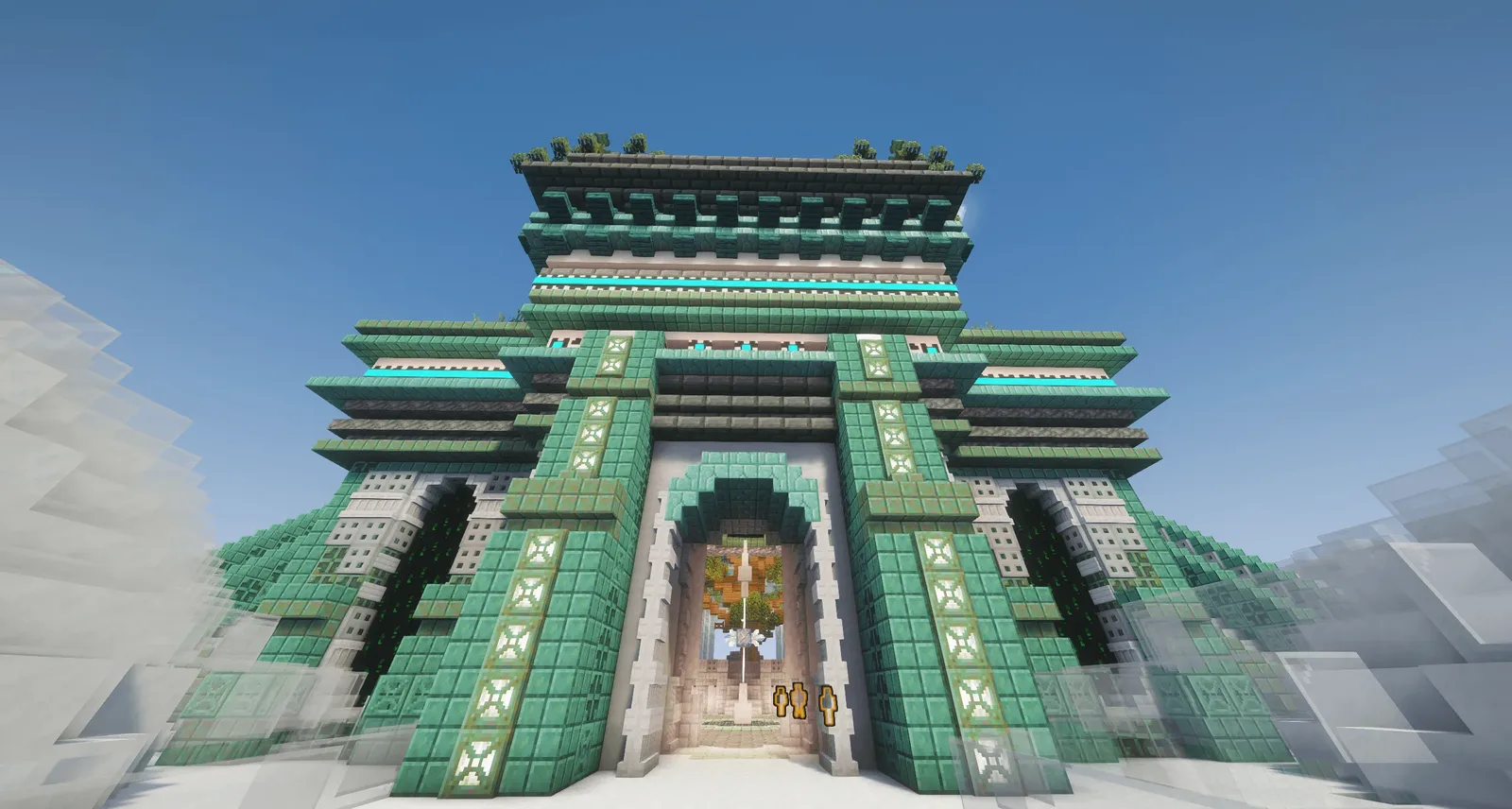
FTB Evolution 2 is Feed The Beast’s new kitchen sink modpack and the sequel to the 2024 pack FTB Evolution. It came out in the FTB App on 8 October 2026 at 16:00 UTC. You start inside the revamped FTB Pyramid and work through tech, magic, the deep sea and space travel towards the Heart of the Beast.
| Detail | FTB Evolution 2 |
|---|---|
| Release | 8 October 2026, 16:00 UTC |
| Current version | 1.0.2 (as of 8 October) |
| Minecraft version | 26.1.2 |
| Mod loader | NeoForge 26.1.2.109 |
| Java | 25 |
| Number of mods | around 420 |
| RAM according to FTB | 6 GB minimum, 8 GB recommended |
| World generation | Tectonic and Terralith |
All values come from FTB’s project page and API.
Which mods are in FTB Evolution 2?
FTB’s description highlights these mods and systems:
| Area | Mods and content |
|---|---|
| Tech | Industrial Contraptions (reworked), LTX Industries, Colossal Reactors, Oritech |
| Logistics and storage | Ender IO, Applied Energistics 2, Refined Storage |
| Resources | Mystical Agriculture, Productive Bees, bacterial colonies |
| Magic | Ars Magica Legacy, Occultism, Witchery |
| Space | Stellaris with rockets, the Moon, lunar dungeons and a space station |
| Character | Puffish Skills, Iron’s Arms ‘n Artifice, Kindred Spirit companion |
| Deep sea | Bioluminescent Groves, Hydrothermal Vents, Abyssal Trench, multiplayer submarine |
| Endgame | FTB Skyline, Heart of the Beast, Challenge Boards for teams |
On top of that comes the companion mod FTB built for the pack. Among other things it adds the FTB Fabricator, a powered assembler with nine input slots, three output slots, fluid tanks and a one million FE buffer.
How much RAM does an FTB Evolution 2 server need?
FTB lists 6 GB as the minimum and recommends 8 GB. Those figures are for the game in the FTB App. A server keeps every player’s bases and machines loaded at the same time, so we plan by group size.
| Players | Recommended package | Why |
|---|---|---|
| 1 to 4 | 8 GB | Matches FTB’s recommendation |
| 5 to 10 | 12 GB | More bases and machines loaded at once |
| more than 10 | 16 GB | Heavy automation, Moon and deep sea active at the same time |
We advise against 4 GB, which is below FTB’s minimum. More background is in How Much RAM Does a Minecraft Server Need?.
Step by step: order a new server with FTB Evolution 2
- On Minecraft Server Hosting, pick a package with at least 8 GB.
- In the setup step, open the Modpacks tab and search for “FTB Evolution 2”.
- Click Select and take the latest version.
- Choose a location, enter the code FTBEVOLUTION and place the order.
The server is then set up with the modpack straight away. You can also let a link remember the code for you: https://respawnhost.com/en/minecraft-server-hosting/?discount=FTBEVOLUTION. It stores the code for 30 days, and the panel applies it automatically when you order.
Step by step: install FTB Evolution 2 on an existing server
- Open your Minecraft server in the panel and go to Marketplace.
- In the wizard, choose Modpack, then Yes, I know the name.
- For the version, pick “I don’t mind” or 26.1. For the platform, pick CurseForge.
- Search for “FTB Evolution 2” and choose the version in the modpack window.
- Leave Create a backup first ticked and install.
- Start the server once the install is done. The first start of a large pack takes a few minutes.
Installing replaces every server file
A modpack install sets the server up from scratch. The world, configs, plugins and every other file are deleted. Keep the backup option on; the install then waits until the backup has finished. How to restore a world is covered in Server Backups.
You do not need to upload FTB packs as a ZIP yourself. FTB does not publish a regular server pack on CurseForge, so our installer pulls the server files straight from FTB’s API. The panel picks the Java version from the Minecraft version, which means Java 25 for 26.1.
How do my friends join?
Every player needs FTB Evolution 2 in the same version as the server. The FTB App or the CurseForge launcher is the easiest way. Then open Multiplayer in game and enter the address from the panel overview. If the versions differ, the server refuses the connection with a message about missing or mismatched mods.
When you update the modpack on the server, every player has to update too. Updates go through the Installed tab in the Marketplace. Take a backup first, because a world you saved is the only clean way back from a broken update.
What RespawnHost recommends
Start with 8 GB on a 30-day prepaid term. Big packs tend to get several updates in a row in the weeks after release. After a month you will know whether your group needs more RAM. If you only play in the evenings, pay-per-use is usually cheaper because a stopped server costs nothing. The discount code does not apply there, though.
Further reading
- Installing Minecraft Mods: Marketplace, modpacks and manual installation
- Minecraft Server Types Compared: NeoForge, Forge, Fabric and Paper
- Minecraft Server Performance: TPS and lag in big modpacks
- Server Backups: Saving and restoring your world
- Minecraft Server Hosting: Packages, prices and locations
FAQ
Question: When did FTB Evolution 2 come out?
On 8 October 2026 at 16:00 UTC in the FTB App.
Question: Which Minecraft version does FTB Evolution 2 use?
Minecraft 26.1.2 with NeoForge. The server needs Java 25 for it.
Question: How do I install FTB Evolution 2 on a server?
In the panel, go to Marketplace, Modpacks, CurseForge, search for “FTB Evolution 2” and install. The installer sets up the server files and Java 25 on its own.
Question: How much RAM do I need for FTB Evolution 2?
FTB lists 6 GB as the minimum and recommends 8 GB. For a server with more than four players we recommend 12 GB.
Question: Is there a discount code for an FTB Evolution 2 server?
Yes. The code FTBEVOLUTION gives 20 percent off prepaid packages and the first subscription month, not pay-per-use and not on top of the term discount.
Question: Will I lose my current world when I install it?
Yes, a modpack install deletes every server file. Use the backup option in the install window to save your world first.
Question: How many mods does FTB Evolution 2 have?
Around 420 in version 1.0.2, according to FTB’s file list.
Question: Can I carry an FTB Evolution 1 world over to part 2?
We advise against it. Part 1 runs on Minecraft 1.21.1, part 2 on 26.1, and FTB has not announced any way to bring old worlds across. Start part 2 with a fresh world.
Your own Minecraft server?
At 3 hours a day that is about €1.50 a month. Billed by the second: server off, costs off.
- No subscription, no minimum term
- Balance does not expire while your account exists
- Online in under 90 seconds