

Wiki & Guides
Rust
Survival · Open World PvP · Facepunch Studios
Rust Admin Commands: Becoming Admin, RCON & the Essential Commands
Become admin on your Rust server (ownerid/moderatorid), the most important vanilla commands with syntax, and RCON tools like RustAdmin — explained compactly.
Last updated July 13, 2026 · RespawnHost
On this page
Becoming admin
Rust has two admin levels, both assigned via the SteamID64:
| Command | Level | Rights |
|---|---|---|
ownerid <SteamID64> "Name" | Auth level 2 | Full rights, may manage admins and change convars |
moderatorid <SteamID64> "Name" | Auth level 1 | Player management (kick, ban, teleport …) |
Here’s how:
- Find your SteamID64 via your Steam profile or steamid.io.
- Run this in the server console in the panel:
ownerid 76561198000000000 "YourName"
server.writecfg- Reconnect once — the rights only apply after a rejoin.
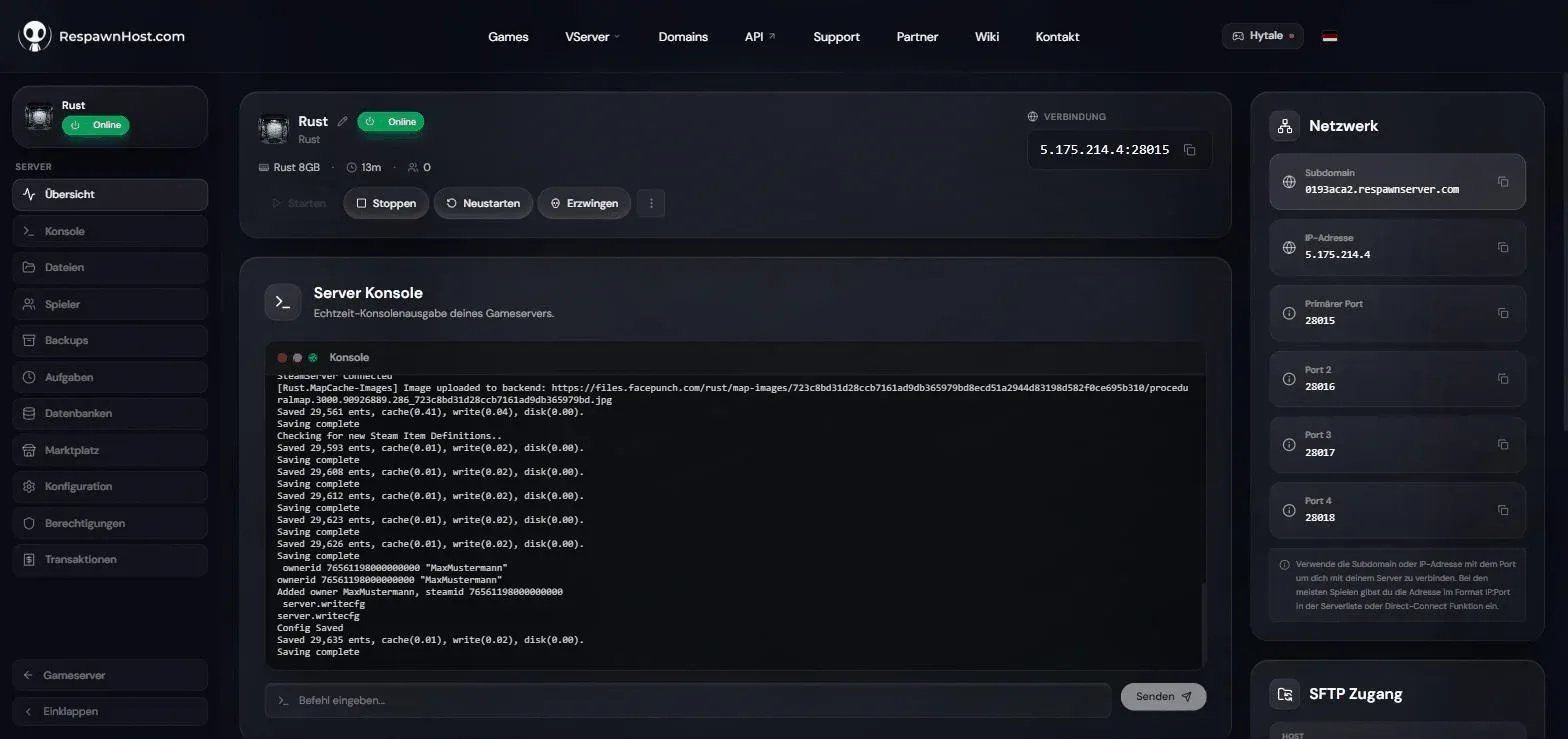
ownerid + server.writecfg in the server console — the server confirms with "Added owner" and "Config Saved"The entries are stored in server/my_server_identity/cfg/users.cfg. Remove them with removeowner <SteamID64> or removemoderator <SteamID64> (then server.writecfg again).
The essential commands
As an admin you use commands in the in-game F1 console or via RCON (see below).
Managing players
| Command | Effect |
|---|---|
status | All connected players with SteamID64, ping & IP |
kick <SteamID64 or name> "reason" | Kick a player off the server |
ban <player> "reason" | Ban a connected player |
banid <SteamID64> "name" "reason" | Ban by SteamID (works offline) |
unban <SteamID64> | Lift a ban |
banlistex | Ban list with names and reasons |
mute <player> / unmute <player> | Mute chat & voice (via RCON/server console) |
say "message" | Server message to global chat |
World & server
| Command | Effect |
|---|---|
server.save | Save world data immediately |
restart 300 "Restarting!" | Restart with countdown in seconds (no argument: 300). Cancel: restart -1 |
quit | Save and shut down the server |
env.time 12 | Set time of day (0–24) |
weather.load Clear | Set weather (Clear, Fog, Storm, RainHeavy …), back to the cycle: weather.reset |
Admin tools (in-game F1 console only)
| Command | Effect |
|---|---|
noclip | Toggle flight mode |
god true / god false | Invulnerability |
teleport "player" | Teleport yourself to a player |
teleport2me "player" | Bring a player to you |
teleportpos (x,y,z) | Teleport to coordinates |
spectate "player" | Spectator mode — exit with respawn |
inventory.giveto "player" "wood" 1000 | Give items to a player |
inventory.give "rifle.ak" 1 | Give items to yourself |
Careful with spectate
spectate kills your character — stash your gear in a box first.
RCON: controlling the server from outside
Rust RCON runs over WebSocket (“WebRCON”). At RespawnHost you have the server console right in the panel — for advanced management you can additionally connect external tools using IP, RCON port and RCON password:
- RustAdmin — popular desktop client with ban management and scheduled commands
- BattleMetrics RCON — web platform with per-staff permissions (no shared password needed)
- webrcon — Facepunch’s official lightweight browser client
All server commands work over RCON — but not commands that need a character in the world (teleport, noclip, spectate, inventory.give).
What does NOT exist
- A plain
givecommand doesn’t exist in vanilla Rust — items only come via theinventory.*commands above. gather.rate& co. are plugin commands (GatherManager) and only work with Oxide/Carbon — see the plugins guide.- Chat commands like
/homeor/tprfor regular players are plugin features too (NTeleportation), not vanilla.
Related guides
- Rent a Rust server — Pay-Per-Use, online in under 90 seconds
- Creating & setting up a server
- Configuring your server — convars & server.cfg
- Installing plugins — Oxide permissions & admin tools
Your own Rust server?
At 3 hours a day that is about €8.63 a month. Billed by the second: server off, costs off.
- No subscription, no minimum term
- Balance does not expire while your account exists
- Online in under 90 seconds