

Wiki & Guides
SCUM
Survival · Open World · Gamepires
Configuring Your SCUM Server: ServerSettings.ini Explained
Time of day, puppets, fame points, squad size & more: the most important SCUM server settings with defaults — right in your RespawnHost panel's file manager.
Last updated July 14, 2026 · RespawnHost
On this page
Configuring your SCUM server
All gameplay rules of your SCUM server live in the file ServerSettings.ini under SCUM/Saved/Config/WindowsServer/. You edit it in the RespawnHost panel’s file manager (or via SFTP). Depending on the game version there are over 400 values, grouped into areas like General, World, Respawn, Vehicles, Damage and Features — keys mostly appear with the scum. prefix (some versions use INI sections like [SCUM.ItemSpawning] instead). Whatever notation your own file uses is the authoritative one.
Note
Stop the server, then edit — changes only take effect on the next start.
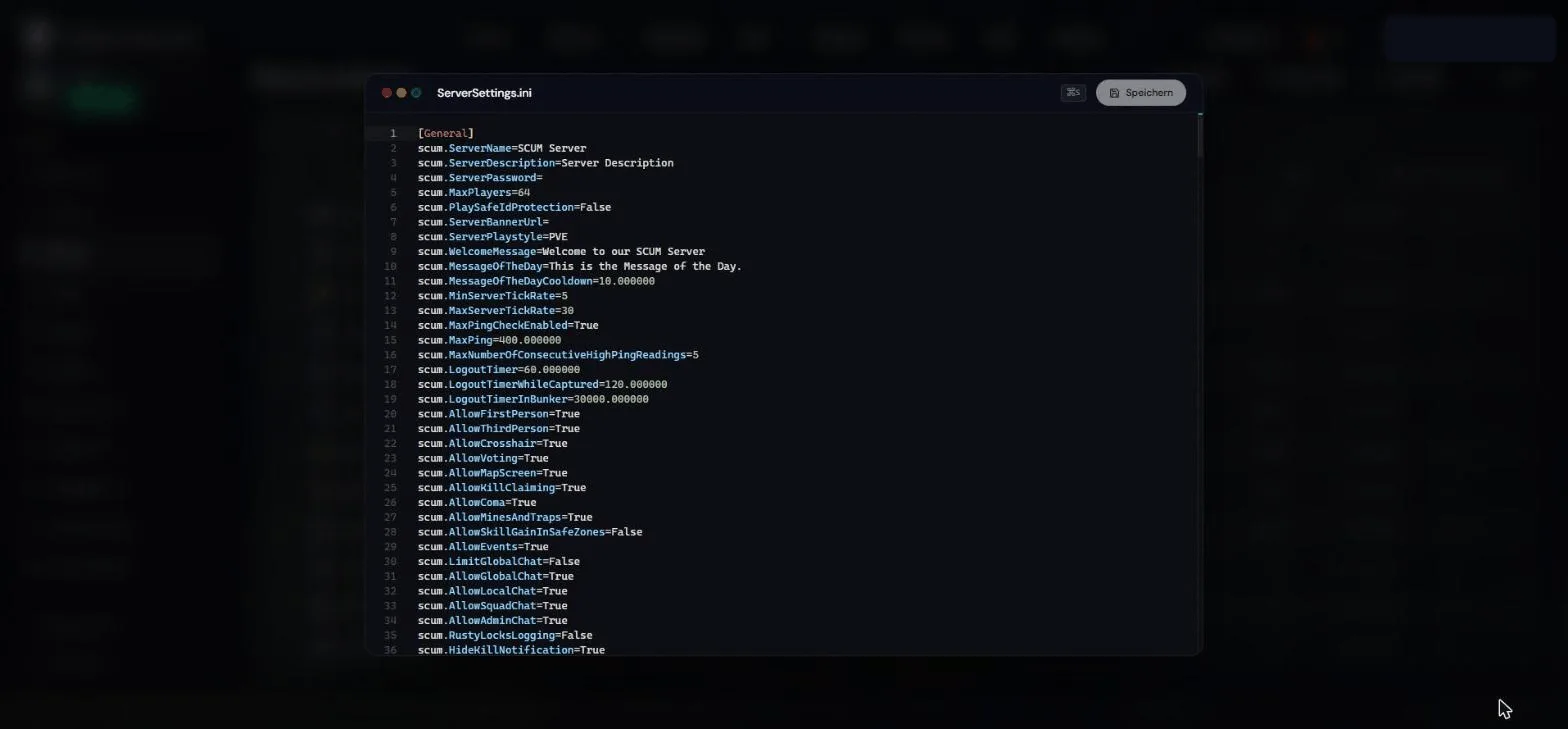
ServerSettings.ini in the file manager — all values use the scum. prefixThe basics
| Setting | Default | Effect |
|---|---|---|
scum.ServerName | SCUM Server | Name in the server browser |
scum.ServerPassword | (empty) | Join password — empty = public |
scum.MaxPlayers | 64 | Maximum number of players |
scum.MaxPing | 400 | Players above this ping get disconnected |
Time of day & night
| Setting | Default | Effect |
|---|---|---|
scum.StartTimeOfDay | 08:00:00 | Time of day on server start |
scum.TimeOfDaySpeed | 3.84 | Time lapse — at 3.84 one in-game day takes about 6.25 real hours. Higher = shorter days. |
scum.SunriseTime / scum.SunsetTime | 06:00 / 21:00 | Sunrise and sunset |
scum.NighttimeDarkness | 0.0 | How dark the night gets |
Puppets & animals
| Setting | Default | Effect |
|---|---|---|
scum.MaxAllowedPuppets | -1 | Puppet cap in the world (-1 = unlimited). A limit relieves busy servers. |
scum.PuppetsCanOpenDoors | True | Whether puppets can open doors |
scum.PuppetHealthMultiplier | 1.0 | Puppet health |
scum.EncounterBaseCharacterAmountMultiplier | 1.0 | How many enemies spawn per encounter |
scum.AnimalGlobalDensityMultiplier | 0.5 | Animal density on the island |
scum.MaxNonVirtualAnimalsInWorld | 500 | Cap for fully simulated animals |
Fame & respawn
Fame points are SCUM’s progression currency — respawning costs fame, among other things:
| Setting | Default | Effect |
|---|---|---|
scum.FameGainMultiplier | 1.0 | How fast players earn fame |
scum.FamePointPenaltyOnDeath | 0.1 | Fame lost on death (fraction) |
scum.FamePointPenaltyOnKilled | 0.5 | Additional loss when another player kills you |
scum.FamePointRewardOnKill | 0.25 | Fame reward for a player kill |
The respawn options (random, sector, shelter, squad) and their fame prices are configurable too (scum.AllowSectorRespawn, scum.SectorRespawnPrice …). Default prices change between game versions — check your own ServerSettings.ini for the current values.
Squad size
Maximum squad size depends on the squad leader’s intelligence attribute — there is one value per level:
scum.SquadMemberCountAtIntLevel1=2
scum.SquadMemberCountAtIntLevel2=4
scum.SquadMemberCountAtIntLevel3=6
scum.SquadMemberCountAtIntLevel4=8
scum.SquadMemberCountAtIntLevel5=10
Set all five values to the same number for a fixed squad size regardless of the attribute.
PvP or PvE?
Warning
The setting scum.ServerPlaystyle=PVE exists in the INI but, according to community documentation, currently has no effect. Control PvE/PvP rules via the zone system in the in-game admin panel instead (set areas to Ignore/Allow/Block) — in real time, no restart needed.
Loot settings
The loot multiplier scum.SpawnerProbabilityMultiplier and the whole spawner system have their own guide: SCUM loot settings.
Where do these values come from?
Gamepires does not maintain an official settings reference. The most reliable sources are the community references (scum.wiki.gg and server-settings.com), which are updated per game version — the defaults above match SCUM 1.3.x (July 2026). When in doubt: your freshly generated ServerSettings.ini shows the defaults of your version.
Related guides
- Creating and connecting to your server — basics and ports
- Loot settings — spawner system & multipliers
- Admin commands — set time, spawn items & more
Your own SCUM server?
At 3 hours a day that is about €10.13 a month. Billed by the second: server off, costs off.
- No subscription, no minimum term
- Balance does not expire while your account exists
- Online in under 90 seconds