
Wiki & Guides
Valheim
Survival · Viking · Iron Gate Studio · Coffee Stain Publishing
Configuring Your Valheim Server: Startup Variables & World Modifiers
Backups, crossplay, password and the world modifiers (presets, combat, death penalty, resources, portals): every Valheim server setting explained — in the RespawnHost panel.
Last updated July 15, 2026 · RespawnHost
On this page
Configuring your Valheim server
A Valheim server has two layers of settings: the startup variables in the RespawnHost panel (name, password, backups, crossplay …) and the world modifiers — Valheim’s official difficulty system that, since the Hildir’s Request update (November 2023), fine-tunes combat, death penalty, resources and more. This guide covers both.
Note
The server must be restarted for changed startup variables to take effect.
The startup variables in the panel
Under your server, in Configuration, you’ll find the Valheim startup variables. The key ones:
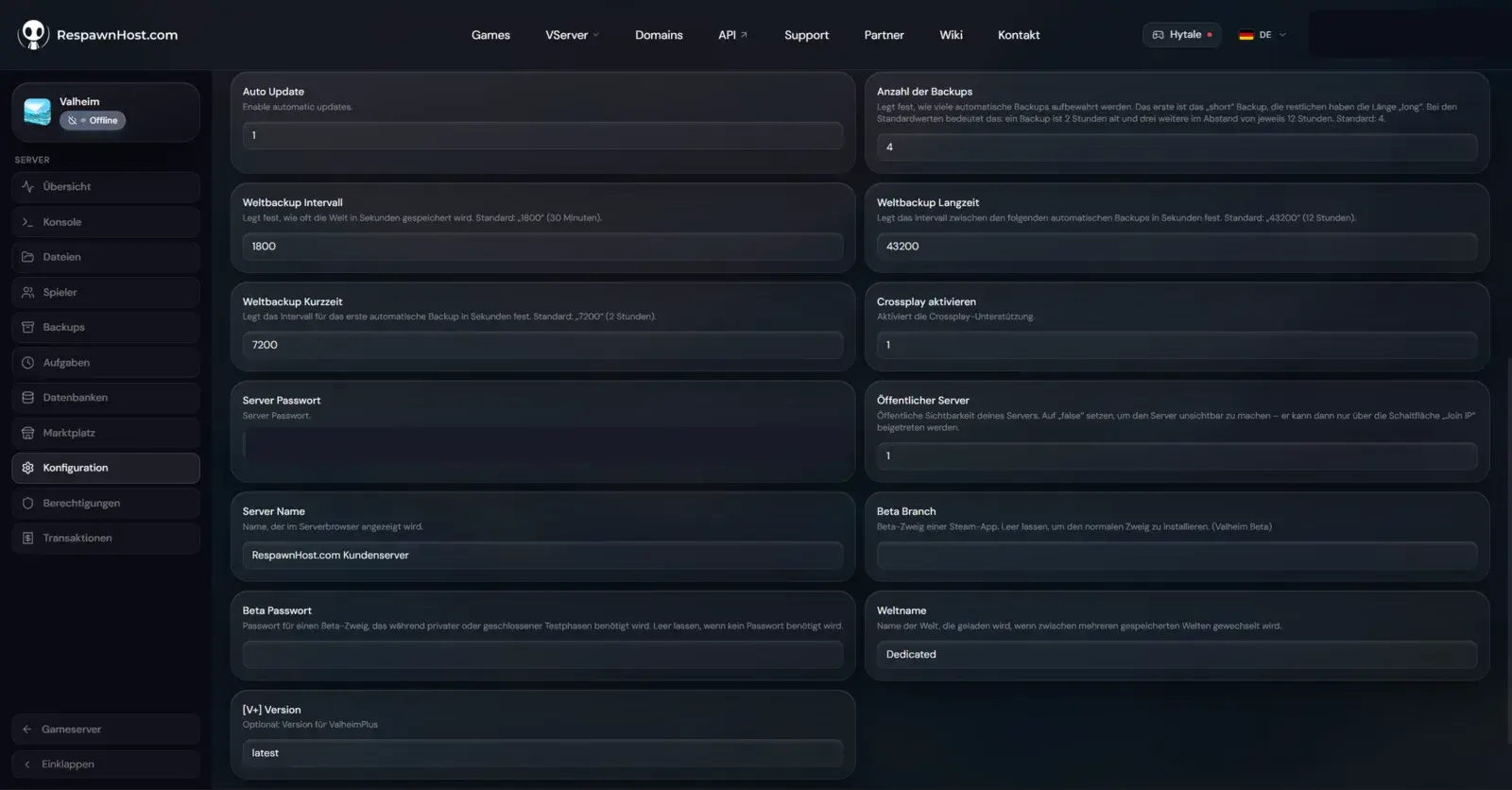
| Setting | Meaning | Default |
|---|---|---|
| Server Name | Name in the server browser | RespawnHost.com Kundenserver |
| Server Password | Access password. At least 5 characters and not contained in the server name, otherwise the server won’t start. Mandatory for public servers. | (pre-filled) |
| World Name | World to load (matches the file name without extension) | Dedicated |
| Public Server | 1 = visible in the server browser, 0 = reachable only via “Join IP”/join code | 1 |
| Enable Crossplay | Cross-platform PlayFab backend (see crossplay guide) | 1 |
| Auto Update | Updates the server on every start | 1 |
| [V+] Version | ValheimPlus version (empty/latest = no fixed pin) — see mods | latest |
| Beta Branch / Beta Password | Steam beta branch (e.g. public-test); leave empty for the normal branch | (empty) |
Understanding backups
Valheim ships its own staggered backup system. The four panel fields map exactly to the official server parameters:
| Field (panel) | Parameter | Meaning | Default |
|---|---|---|---|
| World Backup Interval | -saveinterval | How often the world is saved (seconds) | 1800 (30 min) |
| World Backup Short | -backupshort | Delay until the first auto backup (seconds) | 7200 (2 h) |
| World Backup Long | -backuplong | Delay between the following auto backups (seconds) | 43200 (12 h) |
| Number of Backups | -backups | How many backups are kept | 4 |
With the defaults you always have a roughly 2-hour-old backup plus three more at 12-hour intervals. You can also create a manual backup anytime under Backups in the panel.
World modifiers: Valheim’s difficulty system
The actual “game rules” — how hard enemies hit, what you lose on death, how many resources drop — are set via world modifiers. The easiest way is to pick them when creating your world in-game (world creation menu: preset + individual modifiers) and then upload that world to the server (see transferring a world). Technically they map to the official server startup parameters -preset, -modifier and -setkey.
Presets (-preset)
A preset sets every modifier at once. A preset overrides any previously set individual modifiers.
| Preset | Character |
|---|---|
| Normal | Standard Valheim |
| Casual | Relaxed — milder death penalty, more comfort |
| Easy | Easier combat |
| Hard | Harder combat, more raids |
| Hardcore | Maximum difficulty |
| Immersive | Map/portal-light, more immersive |
| Hammer | Creative/building-focused |
Individual modifiers (-modifier)
| Modifier | Values | Effect |
|---|---|---|
| combat | veryeasy, easy, hard, veryhard | How much damage enemies deal/take |
| deathpenalty | casual, veryeasy, easy, hard, hardcore | Skill loss & tombstone on death |
| resources | muchless, less, more, muchmore, most | Resource drops in the world |
| raids | none, muchless, less, more, muchmore | Frequency of base attacks |
| portals | casual, hard, veryhard | What may be carried through portals |
Toggles (-setkey)
| Key | Effect |
|---|---|
| nobuildcost | Building costs no materials |
| playerevents | Events/raids only when players are nearby |
| passivemobs | Enemies don’t attack on their own |
| nomap | Map & minimap disabled |
Warning
Other -setkey values circulate (e.g. nomapdrops, nobosspowers). Only the four above are officially documented — others come from the separate setglobalkey system and don't work reliably as startup parameters.
Popular configurations
Relaxed with friends — milder death penalty, more yield, building without material stress:
-preset casual -modifier resources more -setkey nobuildcostHarder than vanilla — more combat and raids:
-modifier combat hard -modifier raids muchmorePure build/creative server:
-preset hammerFAQ
Where do I set world modifiers most reliably? When creating the world in-game — you pick the same presets and modifiers from the menu. Then upload that world to the server. Alternatively they map to the startup parameters above.
Do I need to restart for changes? Yes. Startup variables and modifiers only take effect after a server restart.
Can I raise the 10-player limit? Only with mods (e.g. ValheimPlus). Details in the mods guide.
Related guides
- Renting & setting up a server — basics and first steps
- How much RAM do I need? — package recommendations
- Installing mods — BepInEx & ValheimPlus
No server yet? Rent a Valheim server — online in under 90 seconds.
Your own Valheim server?
At 3 hours a day that is about €2.27 a month. Billed by the second: server off, costs off.
- No subscription, no minimum term
- Balance does not expire while your account exists
- Online in under 90 seconds