Wiki & Guides
Rust
Survival · Open World PvP · Facepunch Studios
Configuring Your Rust Server: server.cfg & the Key ConVars
server.cfg, server name, map size, decay, tags & game modes: the most important Rust server settings explained — including the gather rate misconception.
Last updated July 13, 2026 · RespawnHost
On this page
Configuring your Rust server
The basics — server name, description, world size, seed, tags, game mode — are conveniently set via the startup variables in the RespawnHost panel (under “Configuration”, see the server setup guide). Everything beyond that is controlled via convars (console variables). Permanent settings belong in the server.cfg file at server/my_server_identity/cfg/ — reachable via the file manager in the panel or via SFTP. One entry per line, without the + prefix:
server.hostname "My Rust Server"
server.description "Welcome!\nWipe: every first Thursday."
server.tags weekly,vanilla,EU
decay.scale 1
Note
On a fresh server the server.cfg doesn't exist yet — create it in the file manager under server/my_server_identity/cfg/ via "New file". The server must be restarted for changes to take effect. Alternatively, many convars can be set at runtime via the console — they only persist with server.writecfg or an entry in the file.
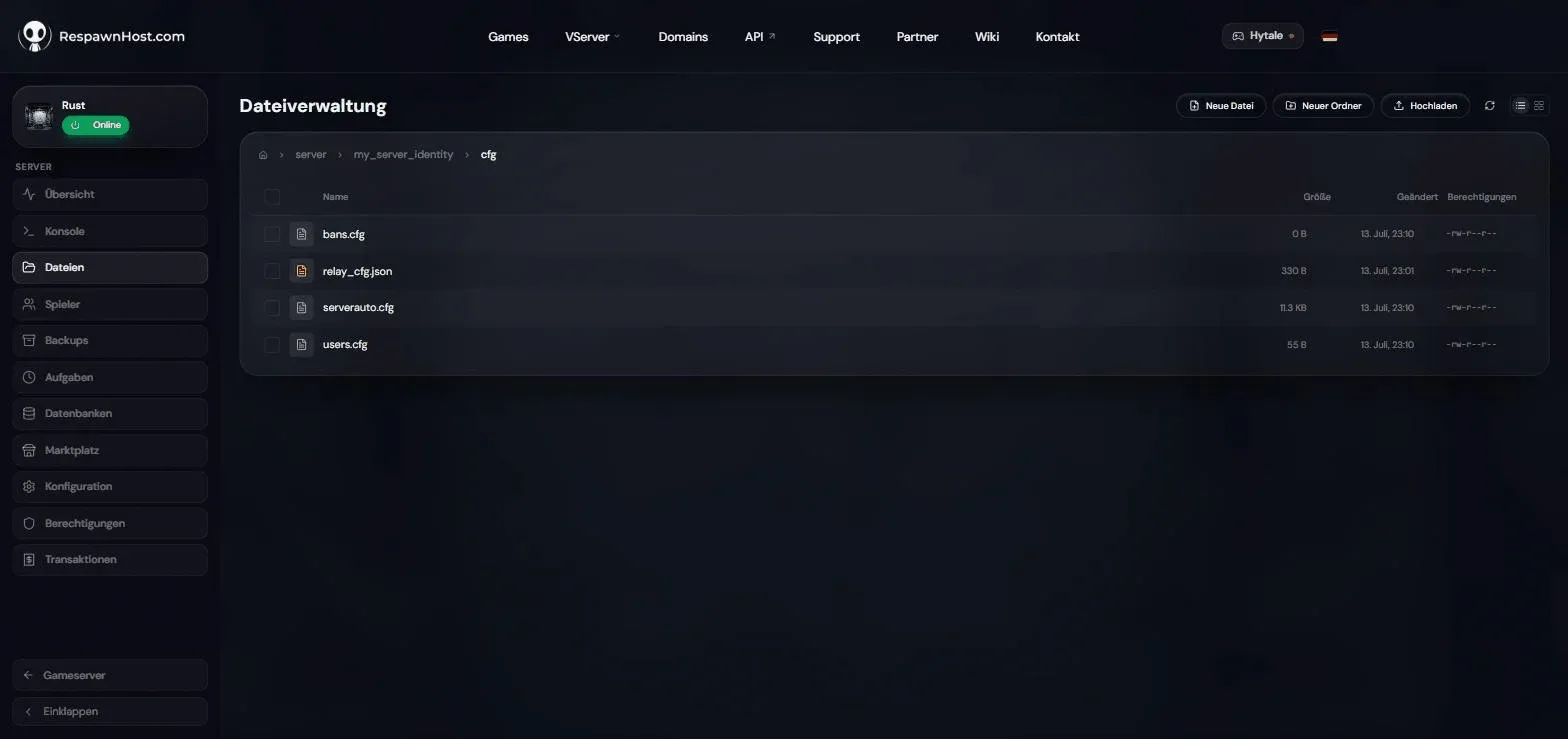
cfg folder: home of users.cfg & co. — you create the server.cfg yourselfThe most important settings
Server name & browser appearance
| Setting | Default | Effect |
|---|---|---|
server.hostname | ”My Untitled Rust Server” | Name in the server browser |
server.description | empty | Description on the connect screen; \n creates line breaks |
server.headerimage | empty | URL to a banner image (512×256 px, PNG/JPG, publicly reachable) |
server.url | empty | Website link shown as a button in the server browser |
World & saving
| Setting | Default | Effect |
|---|---|---|
server.worldsize | 3000 | Map size, 1000–6000. Typical: 3000–4500. Changing it = new map! |
server.seed | — | Map layout, 0–2147483647. Same seed + size = same map |
server.maxplayers | — | Player slots — freely configurable at RespawnHost |
server.saveinterval | 300 | Autosave interval in seconds (RespawnHost sets 60 via startup variable) |
More on seeds, map sizes and custom maps: Maps, seeds & world size.
Gameplay
| Setting | Default | Effect |
|---|---|---|
decay.scale | 1 | Decay speed of structures. 0 = no decay |
decay.upkeep | on | Upkeep system (building costs in the tool cupboard) on/off |
server.pve | off | PvE mode — players can’t damage each other; automatically applies the pve tag |
server.radiation | on | Radiation at monuments |
craft.instant | off | Instant crafting |
server.globalchat | on | Global chat (off = local proximity only) |
Server tags: how players find you
With server.tags you flag your server for the browser filters. The official tags (Facepunch docs) are grouped — never use two tags from the same group, or your server drops out of filtered search:
| Group | Tags |
|---|---|
| Wipe cycle | weekly, biweekly, monthly |
| Difficulty | vanilla, softcore, hardcore |
| Region | EU, NA, SA, WA, EA, OC, AF |
| Freely combinable | pve, roleplay, creative, minigame, training, battlefield, broyale, builds, tut |
Example: server.tags biweekly,vanilla,EU. You don’t set the Modded tag yourself — it’s applied automatically once Oxide or Carbon is installed.
The gather rate misconception
The most-searched Rust server wish — 2x/5x resources — is not a vanilla setting. A convar like gather.rate does not exist in the unmodded game; those commands come from the GatherManager plugin and only work with Oxide/Carbon. How to set that up: Installing Rust plugins.
Game modes: Softcore & Hardcore
Rust ships official game modes, set via the startup parameter +server.gamemode softcore (or gamemode.set at runtime):
- Standard (leave empty): normal Rust. The Facepunch docs explicitly advise against manually setting the value to
vanilla— just leave it out. softcore: more beginner-friendly — after death you can reclaim half your inventory at your death spot or at reclaim terminals (Bandit Camp/Outpost).hardcore: no safe zones, no team system, no in-game map. Note: Facepunch has barely maintained the mode since 2022 and shut down its own Hardcore servers in 2023.
Warning
Never switch game modes mid-wipe — according to the Facepunch docs this irreversibly resets all players including their inventory. Only change the game mode together with a wipe.
Frequently asked questions
How do I turn off decay completely?
decay.scale 0 in the server.cfg (plus restart). For servers without upkeep costs, additionally decay.upkeep false.
Is there a whitelist? Not in vanilla Rust. A private server runs either via the Whitelist plugin (Oxide, see the plugins guide) — or you keep the server name inconspicuous and use an unusual seed.
Why doesn’t my change take effect?
Either the restart is missing, or the convar was only set at runtime and was lost on restart — permanent values belong in the server.cfg.
Related guides
- Rent a Rust server — Pay-Per-Use, online in under 90 seconds
- Creating & setting up a server — from ordering to your first login
- Admin commands & RCON — commands at runtime
- Installing plugins — gather rates, kits, whitelist & more
Your own Rust server?
At 3 hours a day that is about €8.63 a month. Billed by the second: server off, costs off.
- No subscription, no minimum term
- Balance does not expire while your account exists
- Online in under 90 seconds