
Wiki & Guides
Rust
Survival · Open World PvP · Facepunch Studios
Installing Rust Plugins (Oxide/uMod & Carbon)
How to install plugins on your Rust server: enable Oxide/uMod, upload plugins, set permissions — plus the most popular plugins and Carbon as an alternative.
Last updated July 13, 2026 · RespawnHost
On this page
Rust plugins: Oxide/uMod & Carbon
“Mods” in Rust run entirely server-side: the modding framework standard is Oxide (distributed via uMod), and plugins are .cs files the server compiles itself. Best part: your players don’t install anything — they join with the completely normal client.
Note: Modded tab
Once Oxide or Carbon is installed, your server is listed under Modded in the server browser instead of "Community". Gameplay-altering plugins on the Community tab violate Facepunch's guidelines.
Enabling Oxide
At RespawnHost you enable Oxide via the startup variables in the panel (under “Configuration”). Two fields have to match:
- Modding Framework: switch from
vanillatooxide. - Modding Root Directory: set it to
oxideas well.
Then restart the server — Oxide is downloaded and installed automatically. On the first start, the oxide/ folder appears next to the server files, with the subfolders plugins, config, data, lang and logs.
Important
Framework and root directory must both be set to oxide (or both to carbon). If the combination doesn't match, the server start aborts with an error message in the console.
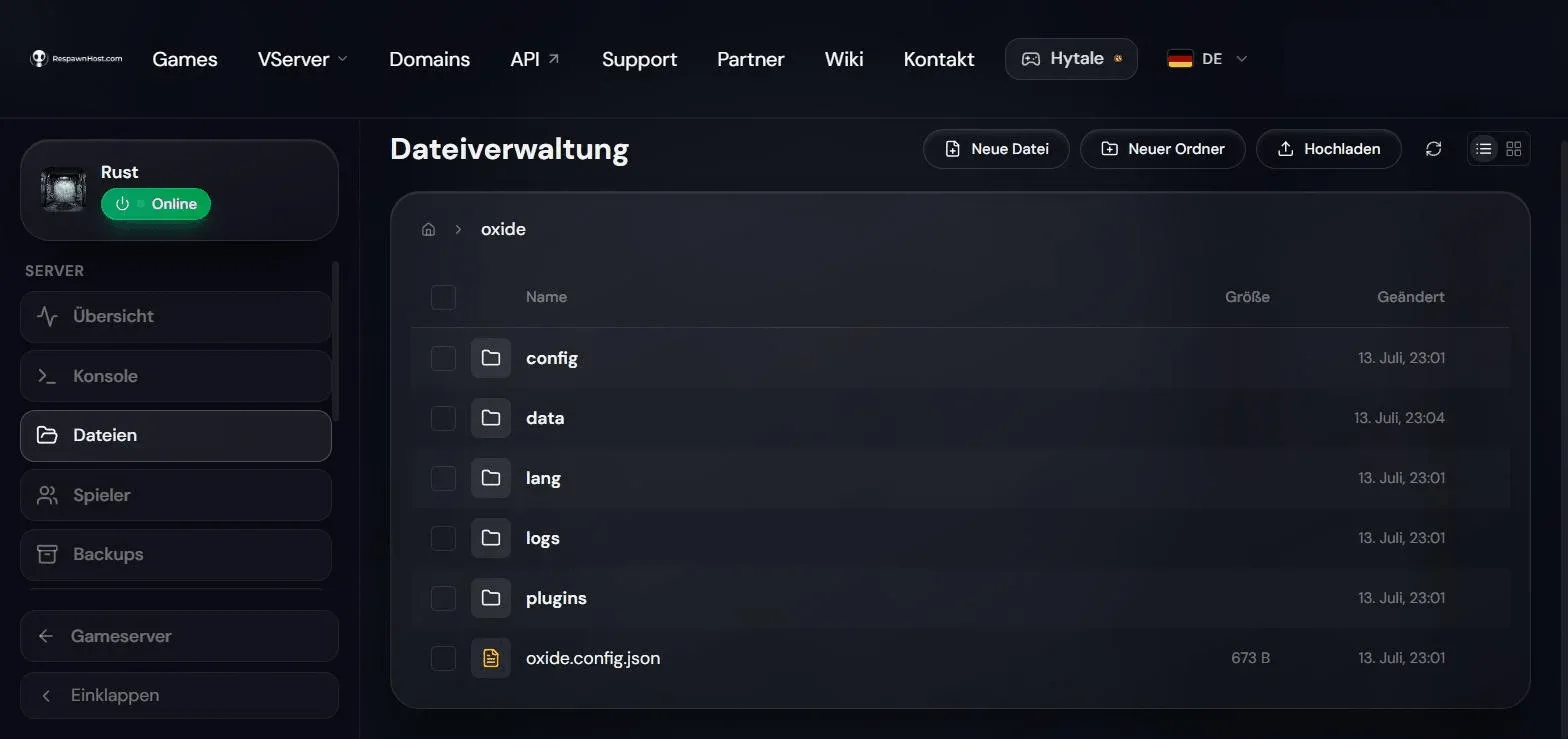
oxide/ folder after the first start — plugins go into plugins/Important: updates
After every Rust update (especially the monthly force wipe update) Oxide must be updated to the matching new build — the uMod team usually publishes it within a few hours. Until then, the server starts unmodded or not at all. Individual plugins may additionally need patches after major updates.
Installing plugins
- Download the plugin as a
.csfile — free plugins live on uMod, paid ones on marketplaces like Codefling and Lone.Design. - Upload the file via the file manager in the panel (or SFTP) to
oxide/plugins/. - Done — Oxide detects new files automatically, compiles them and loads them without a restart (hot loading). To reload manually:
oxide.reload PluginNamein the console.
Most plugins generate a configuration file under oxide/config/ (JSON) on first load — adjust values there and reload the plugin afterwards.
Permissions: granting rights
Many plugins use the Oxide permission system. The key commands (console; the o. shorthand works too):
oxide.grant user <SteamID64 or name> <permission>
oxide.grant group default <permission>
oxide.usergroup add <player> <group>
oxide.revoke user <player> <permission>
Default groups: default (all players) and admin (server owners).
Popular plugins to get started
All of the following are free on uMod:
| Plugin | What it does |
|---|---|
| Gather Manager | Raise resource rates (2x, 5x, 10x …) — the classic |
| Stack Size Controller | Adjust stack sizes per item/category |
| NTeleportation | Homes, teleport requests (/home, /tpr) |
| Rust Kits | Starter kits & autokits on spawn |
| Remover Tool | Remove/refund your own building parts |
| Backpacks | Extra backpack storage |
| Better Chat | Chat titles, colors, formatting |
| Vanish | Admin invisibility |
| Admin Radar | Admin ESP for moderation |
| Furnace Splitter | Auto-split ore across furnace slots |
| Quick Smelt | Faster smelting |
| Whitelist | Private server: only approved players may join |
| Economics + GUI Shop | Currency & in-game shop |
Whitelist example: install the plugin, then per player run oxide.grant user <SteamID64> whitelist.allow.
Carbon: the alternative
Carbon is a modern drop-in replacement for Oxide: same folder structure, and most Oxide plugins run unchanged. Advantages: lower resource usage (it only loads the hooks plugins actually use) and no reinstalling after Rust updates (in-memory patching, self-updating). At RespawnHost, Carbon is enabled the same way as Oxide: set Modding Framework and Modding Root Directory both to carbon, then restart. Important: never Oxide and Carbon at the same time — pick one.
Frequently asked questions
Do my players need to install anything? No. Rust modding is purely server-side — the client stays untouched (and EAC-protected).
My plugin doesn’t load — what now? Check the console: compiler errors appear on load. Most common causes: an outdated plugin after a Rust update or a missing dependency (some plugins need e.g. Economics as a base).
How do I see which plugin eats resources?
oxide.stats in the console shows per-plugin usage — helpful for RAM issues.
Related guides
- Rent a Rust server — Pay-Per-Use, online in under 90 seconds
- Configuring your server — convars & server.cfg
- Admin commands & RCON — incl. Oxide commands via RCON
- Wipes — what happens to Oxide on force wipe
Your own Rust server?
At 3 hours a day that is about €8.63 a month. Billed by the second: server off, costs off.
- No subscription, no minimum term
- Balance does not expire while your account exists
- Online in under 90 seconds