
Wiki & Guides
Minecraft
Sandbox · Survival · Mojang Studios · Xbox Game Studios
Install Chunky: Pre-Generate Your Minecraft World (Beginner Guide)
Chunky step by step: install the plugin in the RespawnHost panel, pre-generate your world, pause and resume. With commands, radius tips and common errors.
Last updated November 3, 2026 · RespawnHost
On this page
- Install Chunky and pre-generate your Minecraft world
- What is a chunk and why does exploring lag?
- Which Chunky version do I need?
- Install Chunky in the RespawnHost panel
- 1. Find Chunky in the marketplace
- 2. Pick the version and install
- 3. Restart the server
- Pre-generate the world: the commands step by step
- 1. Check what Chunky would generate
- 2. Set the radius
- 3. Start
- 4. Do not forget the Nether and the End
- Pause, resume and cancel
- Does Chunky continue after a restart?
- Auto-stop and billing while Chunky runs
- How long does pre-generation take?
- How much RAM and disk space does Chunky need?
- What RespawnHost recommends
- Use Chunky with a world border
- Common problems with Chunky
- Chunky FAQ
- Is Chunky free?
- Do I have to uninstall Chunky after pre-generating?
- Can I pre-generate an existing world?
- Can players be online while Chunky runs?
- Which radius should I use?
- Does Chunky work with modpacks?
- What is the difference between chunky pause and chunky cancel?
- Read more
Install Chunky and pre-generate your Minecraft world
Chunky builds the terrain of your Minecraft world in advance, before anyone walks there. Normally the server only calculates new areas when a player enters them, and that is exactly what slows small servers down while exploring. With Chunky you install the plugin in the panel, type chunky radius 3000 and chunky start into the console and wait until the task is done. From then on the server only loads those areas from disk.
In short:
| Question | Answer |
|---|---|
| What is Chunky for? | Generating the world in advance so exploring no longer lags |
| Which servers? | Paper, Spigot, Purpur, Folia (plugin), Fabric, Forge, NeoForge (mod) |
| Where do I install it? | Panel → Mods & Templates → Mods → search for “Chunky” |
| Most important commands | chunky radius 3000, chunky start, chunky pause, chunky continue |
| Do I have to keep Chunky? | No. The generated areas stay saved in the world |
| Does Chunky cost anything? | No, Chunky is free and open source |
What is a chunk and why does exploring lag?
A Minecraft world is made of chunks, areas of 16 × 16 blocks. When a player walks into an area nobody has visited yet, the server has to calculate terrain, caves, trees, villages and structures right then. That takes a lot of processing time. On a server with little RAM you notice it as stutter, blocks snapping back or mobs moving in jumps.
Chunky does this work beforehand. The server calculates the chunks at its own pace, for example at night or before your friends come online for the first time. Later it only has to load them, and loading is much faster than generating.
Biggest gain on small servers
The less RAM and the more players exploring in different directions at the same time, the bigger the difference. More tips against lag are in the guide Optimize Minecraft Server Performance.
Which Chunky version do I need?
Chunky exists for almost every server software. The only thing that matters is that the version matches yours:
| Server software | Chunky variant | Folder | Also required |
|---|---|---|---|
| Paper, Purpur, Spigot, Folia | Plugin (Bukkit) | plugins | nothing |
| Fabric | Mod | mods | Fabric API |
| Forge, NeoForge | Mod | mods | nothing |
As of November 2026, Chunky 1.5.3 supports Minecraft up to 26.3 on Paper, Spigot, Folia and Fabric. Forge and NeoForge get Chunky 1.5.4. Which software your server runs is shown at the top of the overview in the panel, or in the marketplace under “Your server runs”. The differences are explained in Minecraft Server Types Compared.
Install Chunky in the RespawnHost panel
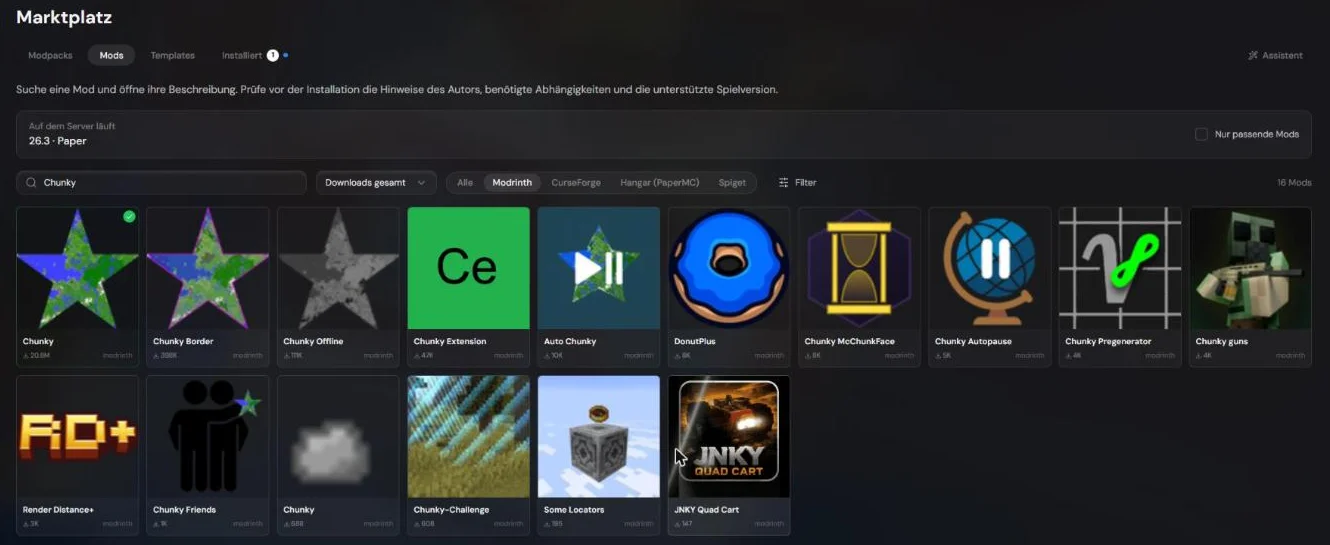
1. Find Chunky in the marketplace
Open your server in the panel and click Mods & Templates on the left. Choose the Mods tab at the top and type “Chunky” into the search box. Pick the entry Chunky by pop4959, that is the developer.
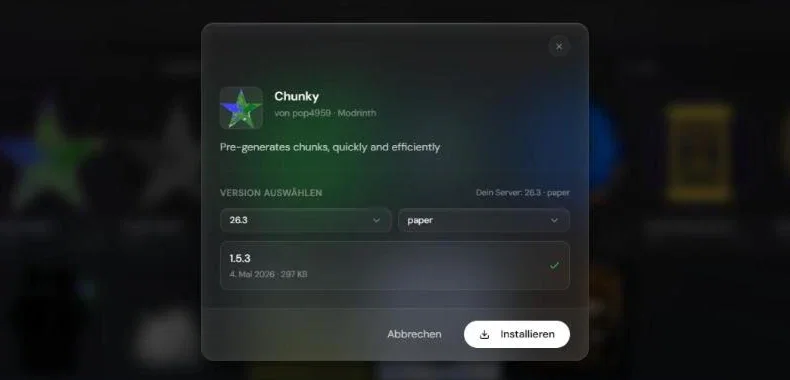
2. Pick the version and install
Click Chunky. The window already preselects your server’s game version and software, for example “26.3” and “paper”. The matching Chunky version is listed below. Click Install.
3. Restart the server
The server only loads a plugin on startup. Click Restart on the overview. The console then shows the line [Chunky] Enabling Chunky v1.5.3. The file now sits in the plugins folder, and Chunky creates a Chunky folder next to it with its settings file.
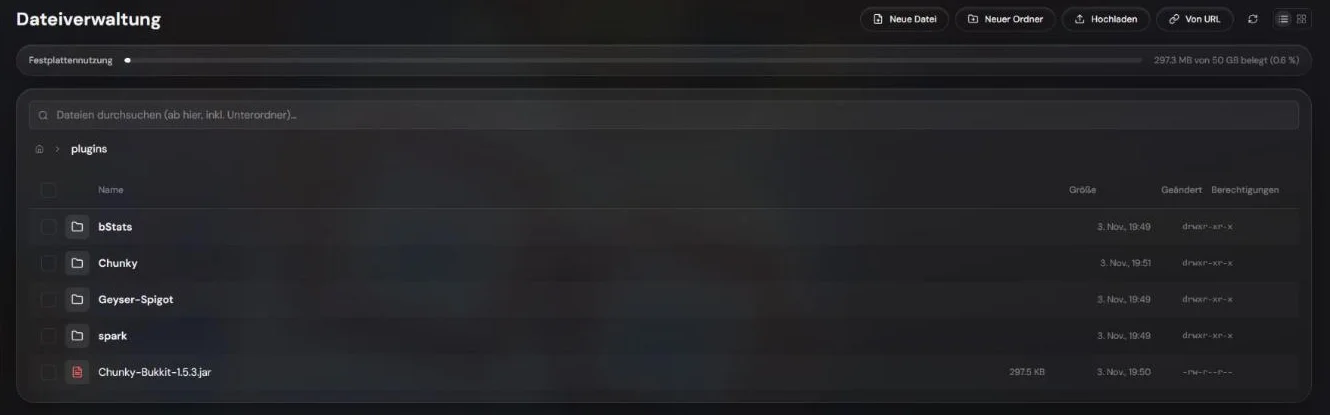
pluginsPrefer installing by hand?
Download the matching file from Modrinth and upload it in the file manager with Upload into plugins (Paper and friends) or mods (Fabric, Forge, NeoForge). On Fabric, the Fabric API goes into mods as well. Restart the server afterwards.
Pre-generate the world: the commands step by step
Type all commands into the console at the bottom of the Overview, without a slash. In game they work with a slash (/chunky start), but you need operator rights.
1. Check what Chunky would generate
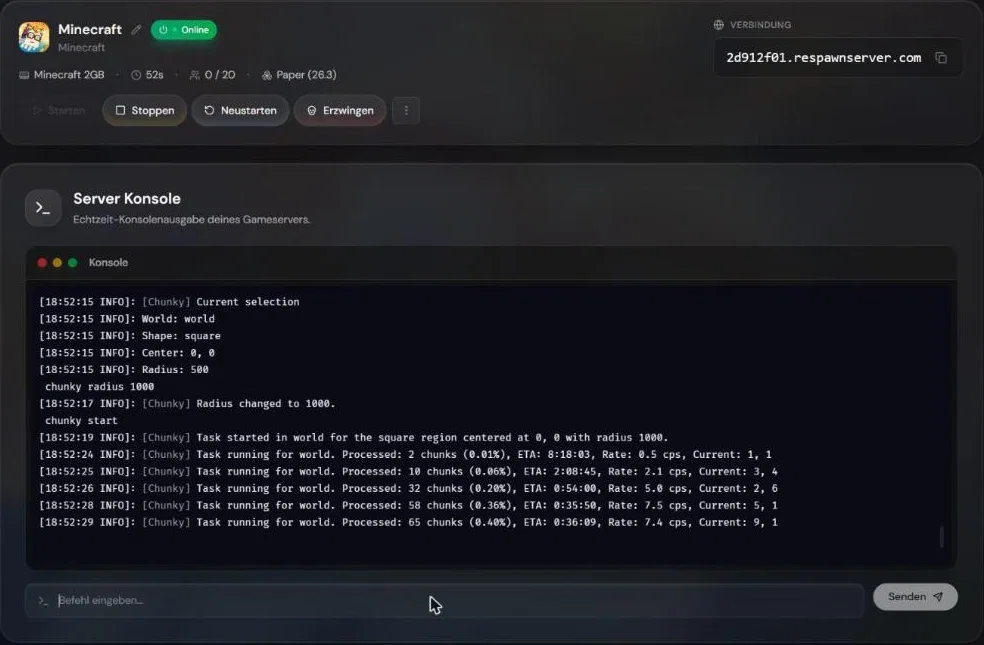
chunky selectionChunky shows the current selection. Without changes that is the overworld (world), as a square around the center 0, 0 with a radius of 500 blocks.
2. Set the radius
chunky radius 3000The radius is the distance from the center to the edge, in blocks. With 3000 Chunky generates a square of 6000 × 6000 blocks. Start smaller and extend later, Chunky skips chunks that already exist.
To generate around the spawn instead of 0, 0, stand at the spot in game and type /chunky center, or use chunky spawn in the console.
3. Start
chunky startEvery second the console prints a progress line: generated chunks, percentage, estimated time left (ETA) and speed in chunks per second (cps).
4. Do not forget the Nether and the End
Chunky only generates the world that is currently selected. For the Nether and the End you switch the world and start again:
chunky world world_nether
chunky radius 1500
chunky start
chunky world world_the_end
chunky radius 1000
chunky startWorld names depend on the software:
| World | Paper, Spigot, Purpur | Fabric, Forge, NeoForge |
|---|---|---|
| Overworld | world | overworld |
| Nether | world_nether | the_nether |
| End | world_the_end | the_end |
A smaller radius is enough in the Nether, because one block there equals eight blocks in the overworld.
Pause, resume and cancel
| Command | What it does |
|---|---|
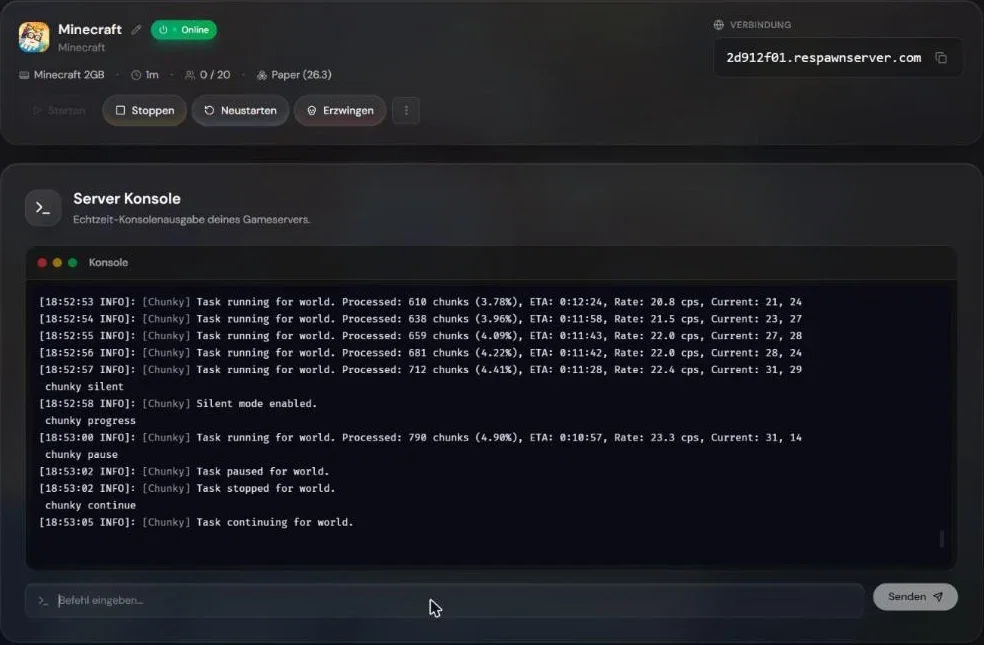
chunky progress | shows the current progress |
chunky pause | stops and saves the progress |
chunky continue | resumes where the task left off |
chunky cancel | stops and deletes the task; chunks already generated stay |
chunky silent | turns the progress lines in the console off or on again |
Does Chunky continue after a restart?
No, not on its own. Chunky saves an unfinished task when you pause it and when the server stops normally, but after the next start you have to type chunky continue.
To let Chunky resume automatically, change it in plugins/Chunky/config.yml:
- Stop the server.
- In the file manager open
plugins→Chunky→config.yml. - Change
continue-on-restart: falsetocontinue-on-restart: trueand save. - Start the server again.
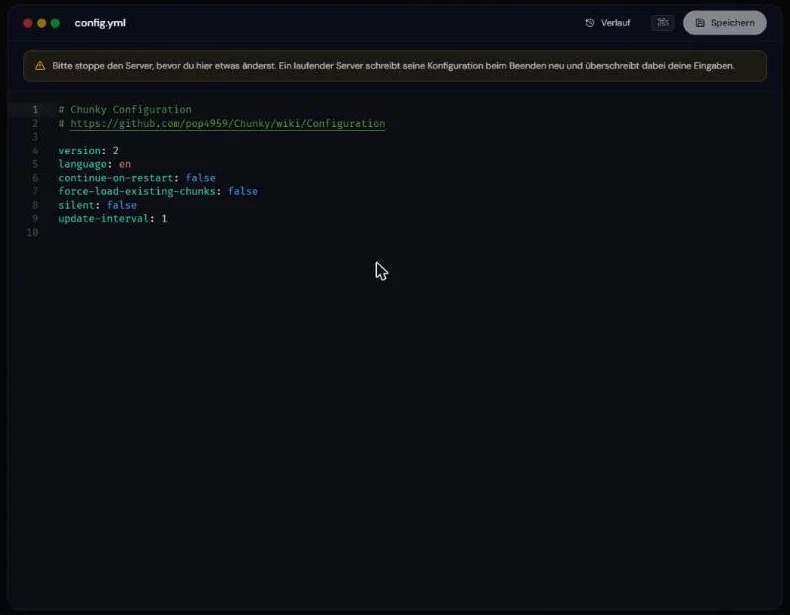
config.yml. The panel reminds you to stop the server first.Stop first, then edit
If you edit the file while the server is running, the server rewrites it on shutdown and your change is lost.
In the same file, language: de switches messages to German, and other languages are available too.
Auto-stop and billing while Chunky runs
This is the most important point for RespawnHost servers: auto-stop only sees players, not Chunky. If nobody is online, it can shut the server down in the middle of pre-generation. For long runs you have two options:
- Turn auto-stop off in your server’s Settings while pre-generating and switch it back on afterwards.
- Or set
continue-on-restart: true, then Chunky resumes on its own after the next start.
With pay-per-use you pay for the runtime even when only Chunky is working, so plan the run and do not forget to stop the server at the end. According to the Chunky docs the server should not pause during pre-generation, so check that server.properties contains pause-when-empty-seconds=-1.
How long does pre-generation take?
Mostly it depends on the radius, because the area grows with the square. Double the radius means four times as many chunks.
| Radius | Area | Chunks (approx.) |
|---|---|---|
| 1000 | 2000 × 2000 blocks | 16,100 |
| 3000 | 6000 × 6000 blocks | 142,000 |
| 5000 | 10,000 × 10,000 blocks | 393,000 |
What we measured: On our test server with 2 GB RAM, Paper 26.3 and an Eco plan, Chunky generated a radius of 1000 in the overworld (16,129 chunks) in 7 minutes 39 seconds, about 35 chunks per second on average. At the same speed a radius of 5000 would take a little over three hours. Mods, datapacks with custom world generation and friends playing at the same time slow it down. The most accurate estimate is always the ETA in the console.
How much RAM and disk space does Chunky need?
- RAM: Memory use rises noticeably while pre-generating, because chunks are loaded and unloaded quickly. That is normal. If the server crashes during the run, it needs more RAM. How much makes sense is covered in How Much RAM Does a Minecraft Server Need?.
- Disk space: Every generated region ends up as a file in your world folder. Its size grows like the area, with the square of the radius. On our test server a radius of 1000 in the overworld took about 200 MB; a radius of 5000 would be roughly 25 times that, around 5 GB. For a rough estimate the Chunky developer recommends the World Size Calculator at onlinemo.de/world. How full your server is shows at the top of the file manager under Disk usage.
Make a backup first
Chunky itself deletes nothing. A backup before big changes to the world is still a good habit, especially before you use chunky trim.
What RespawnHost recommends
- Small group of friends: overworld with a radius of 3000 to 5000, Nether with 1500. That is enough for weeks of play.
- Bigger server or SMP: set the world border first, then pre-generate exactly that far. Players then never reach ungenerated areas.
- Map plugins such as Dynmap or BlueMap: turn them off briefly during pre-generation. According to the Chunky docs it is faster, and the map renders once afterwards.
- After pre-generating you can keep Chunky installed. Without a running task it costs no performance.
Use Chunky with a world border
A world border defines how far players can walk. If you already set one, Chunky takes its center and radius:
chunky worldborder
chunky start
You set a border in the console like this: worldborder center 0 0 and worldborder set 10000. The number after worldborder set is the diameter, so twice the radius Chunky uses.
Do not make the border too small
Mobs do not spawn outside the world border. If the border is smaller than the pre-generated area, the outer parts stay empty, and only a backup or regenerated chunks fix that.
Common problems with Chunky
| Problem | Cause and fix |
|---|---|
chunky is not recognized | Server not restarted after installing, or the variant does not match the software (plugin on Fabric, mod on Paper) |
| Command does not work in game | You need operator rights (op YourName in the console) |
| Chunky suddenly stops | The server was stopped, for example by auto-stop. Type chunky continue or enable continue-on-restart |
| Server crashes while pre-generating | Not enough RAM, or another plugin or mod conflicts. Test with only Chunky installed |
| No mobs after pre-generating | World border was smaller than the area, see above |
| Treasure maps lead nowhere | Known Minecraft bug. On Paper, set find-already-discovered for loot-tables under treasure-maps in config/paper-world-defaults.yml to false |
| Dynmap or BlueMap do not show the new areas | Render the map once more |
Chunky FAQ
Is Chunky free?
Yes. Chunky is free and open source, the code is on GitHub at pop4959/Chunky.
Do I have to uninstall Chunky after pre-generating?
No. The chunks stay saved in the world whether Chunky stays installed or not.
Can I pre-generate an existing world?
Yes. Chunky skips chunks that already exist and only generates the missing ones. Your builds stay untouched.
Can players be online while Chunky runs?
Yes, but it gets slower for everyone. It is fastest and smoothest before players arrive or at night.
Which radius should I use?
Start with 3000 in the overworld. If that is not enough, set a larger radius later and start again.
Does Chunky work with modpacks?
Yes. Chunky lets the server generate the chunks itself, with all mods and datapacks. With many mods it takes much longer than vanilla, though.
What is the difference between chunky pause and chunky cancel?
pause remembers the progress and continue picks it up again. cancel deletes the task completely, but the chunks already generated stay.
Read more
- Optimize Minecraft Server Performance: view-distance, simulation-distance and Spark
- The Best Minecraft Plugins: more plugins for Paper and Spigot
- Minecraft Server Types Compared: Paper, Fabric, NeoForge and more
No server yet? At RespawnHost you can rent a Minecraft server and install Chunky straight from the marketplace.
Your own Minecraft server?
At 3 hours a day that is about €2.65 a month. Billed by the second: server off, costs off.
- No subscription, no minimum term
- Balance does not expire while your account exists
- Online in under 90 seconds